
Convert Speech to Text Online Free Your Ultimate Guide

Of course you can convert speech to text online free. These days, browser-based tools are incredibly powerful, and many have generous free plans that let you transcribe audio files and even live conversations without paying a dime. You get high accuracy, multi-language support, and features like timestamping, all without installing any software.
Why Free Online Transcription Is a Game Changer
High-quality transcription isn't a luxury anymore; it's a must-have tool for getting work done. The painful days of manually typing out interviews or meeting notes are officially over. They've been replaced by instant, AI-powered services that save a truly ridiculous amount of time.
Whether you're a journalist on a deadline, a student trying to capture every word of a lecture, or a remote team needing to document a key decision, the need for accurate, searchable text is the same. And today's free tools go way beyond simple dictation.
The Evolution from Basic Tools to Smart Platforms
The tech has grown up fast, fueled by a market that is just exploding. The global speech-to-text API market went from $2.2 billion in 2021 and is on track to hit $5.4 billion by 2026. That boom is all about the massive demand for tools that turn voice into useful text. For those of us using platforms like SpeechYou, it just means more powerful and accessible tools for everyone.
This shift brings some huge benefits to the table:
- Instant Access: You can be transcribing in seconds, right from your browser. No downloads, no messing with installers.
- AI-Powered Insights: Modern tools don't just give you words. They can pull out summaries, identify action items, and find keywords automatically.
- Multi-Language Support: Many free services can automatically figure out what language is being spoken and transcribe dozens of them, which is perfect for global teams.
- Works Everywhere: Top services like SpeechYou give you a seamless experience, with a powerful browser tool and dedicated mobile apps for iOS and Android, so you can capture audio on the go.
The explosion of AI for content creation has been a huge part of this, making free online transcription a genuine game changer for anyone creating content.
The real win here isn't just turning audio into words. It's about unlocking all the valuable information that was trapped in those recordings. A searchable, editable transcript turns a one-hour meeting into a permanent asset you can search, share, and build on forever.
This is all about working smarter, not harder. By letting a machine handle the tedious transcription work, you free up your own brainpower to focus on what actually matters: analyzing information, working with your team, and doing great work. If you're looking to make the most of this, improving how your team documents things is a fantastic place to start. You might find our guide on how to improve team communication helpful.
Turning Your Audio Files into Text
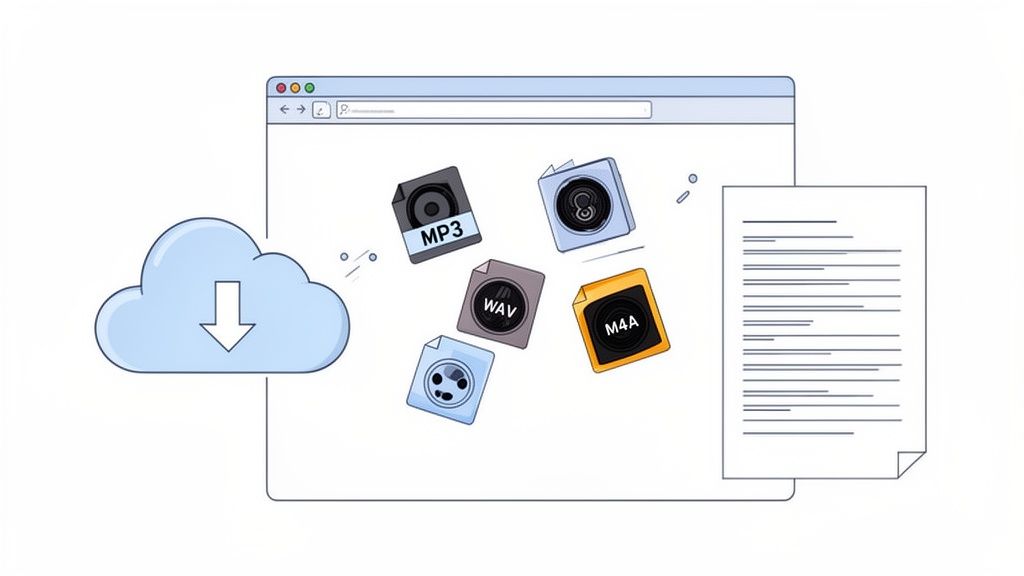
While live dictation is great for capturing thoughts in the moment, a lot of the time we're dealing with audio that already exists. Think about that podcast interview you just wrapped up, the voice memo full of ideas from your morning walk, or a two-hour lecture you need to review.
For these situations, you need a way to convert speech to text online free without any fuss. The goal is to get from an audio file on your desktop to a full, timestamped transcript in just a few minutes.
Modern tools like SpeechYou make this dead simple. It’s all about a smooth drag-and-drop experience that removes the technical headache and lets you get straight to the good stuff—the text.
Getting Your Audio Ready for Transcription
Before you even think about uploading, a little prep can make a huge difference. The cleaner your source audio, the more accurate your final transcript will be. While today's AI is incredibly powerful, it's not magic; garbage in, garbage out still applies.
Luckily, you don't need to be an audio engineer. Most online tools are flexible and handle a wide range of common formats.
- MP3: This is the workhorse for a reason. Its small file size is perfect for uploading long recordings like interviews or podcasts without a long wait.
- WAV: If accuracy is your number one priority and file size is no object, go with WAV. It's an uncompressed format, meaning it holds the highest possible audio quality.
- M4A: Common on Apple devices, M4A strikes a great balance between quality and file size, much like an MP3.
The key takeaway here is simple: you don't need to overthink it. Just pick a standard format, make sure the speaking is clear, and let the transcription engine do its job.
One of the biggest advantages of a tool like SpeechYou is that you’re not chained to your desk. With dedicated mobile apps for iOS and Android, you can upload a recording straight from your phone. Whether you just finished a field interview or want to transcribe a voice note from your commute, you’re covered. SpeechYou is available everywhere, so you can start on your phone and finish on your desktop seamlessly.
Uploading and Processing Your Files
Once your file is ready, the rest is easy. You’re just a few clicks away from an editable text document. For a deeper dive, there are plenty of great tutorials on how to transcribe audio files to text that explore different scenarios.
But for the most part, the process looks something like this:
- Find the upload section of the tool.
- Drag your audio file right into the browser window or click to select it from your device.
- The platform gets to work, analyzing the audio, figuring out the language, and kicking off the transcription.
A solid platform will handle large files without timing out or throwing errors. And if you're juggling multiple projects, our own guide on https://speechyou.com/stt-transcription can show you how to keep everything organized. It's all designed to get the technical steps out of your way so you can focus on your content.
Transcribing Live Speech in Real Time
Let's switch gears from pre-recorded files and talk about capturing conversations as they happen. Whether you're in a team brainstorm, a virtual class, or a client call, being able to transcribe live speech is a massive advantage for anyone who needs to document what’s being said.
Imagine this: you're fully engaged in a discussion, firing off ideas, without having to worry about taking notes. All the while, a searchable text record is being created for you in the background. This isn't some far-off concept; it’s something you can do right now with modern tools that convert speech to text online free, straight from your web browser.
Capturing Every Word Without Extra Software
The real magic here is simplicity. You don’t need to download clunky plugins or fiddle with complicated setups. Smart services like SpeechYou can simply listen to your computer's system audio to capture what’s happening in a Zoom or Google Meet call. It just works.
This browser-based approach is a huge step forward, and the market reflects that. North America held the largest share of the speech-to-text API market at 32.27% back in 2019, driven largely by businesses adopting the tech. After COVID sent everyone remote, usage in healthcare and education shot up by 25% and 35%, respectively, as real-time documentation became a necessity.
Best Practices for Crystal-Clear Live Transcripts
The AI does the heavy lifting, but the quality of your audio input is still king. A few simple tweaks can make a world of difference in the accuracy of your live transcript.
- Mind Your Mic: You don't need a pro studio setup, but your microphone placement matters. Keep it close enough to hear your voice clearly but not so close it picks up every breath. Even your laptop's built-in mic can do a decent job if you're in a quiet room.
- Kill the Crosstalk: When people talk over each other, even the best AI gets confused. It's just good meeting etiquette to let people finish their thoughts, and it dramatically improves the transcript's accuracy.
- Cut the Background Noise: Shut the window, put your phone on silent, and find a quiet spot if you can. Every little bit of background chatter you can eliminate gives the AI a cleaner signal to work with.
The goal is to give the technology the best possible source material. A clear, single-speaker audio stream will almost always yield a near-perfect transcript, making your final review and editing process much faster.
And this isn’t just for your desktop. A huge benefit of a platform like SpeechYou is that it’s available everywhere you are. With dedicated mobile apps for iOS and Android, you can capture and transcribe conversations live from your phone or tablet. You’ll never miss a critical detail, no matter where your work takes you. If you need to make a quick recording on the fly, you can also check out our own online voice recorder for any device.
Putting Your Transcripts to Work
Getting a raw text file is a great first step, but it's really just the beginning. The real magic happens after you've converted your audio to text. A huge wall of text isn't very useful on its own, but an organized, summarized, and properly formatted transcript is a massive asset.
This is where you shift from just dictating to actually boosting your productivity. Forget spending an hour manually re-reading the notes from a 60-minute project call. Modern tools let you generate a five-point summary, pull out key decisions, and identify action items in seconds.
Choosing the Right Export Format
Once your transcript is ready, how you save it is critical and depends entirely on what you plan to do next. Different projects need different formats, and picking the right one from the start will save you a ton of headaches.
Think of it this way:
- TXT (Plain Text): This is your simplest option. It's perfect for quick notes, pasting into an email, or dropping into a basic document. It’s universally compatible but has no formatting or timing data.
- SRT (SubRip Subtitle File): If you're creating videos, SRT is the industry standard for captions. It contains the all-important timestamps that sync the text directly to your video, making your content accessible to everyone. We dive deeper into this in our guide on creating an SRT file.
- JSON (JavaScript Object Notation): For developers or anyone plugging transcription into an automated workflow, JSON is a powerhouse. It gives you a structured data file with not just text and timestamps, but also speaker labels and confidence scores—perfect for feeding into other applications.
This decision tree helps visualize whether you should start your transcription process using a mobile app or your browser.
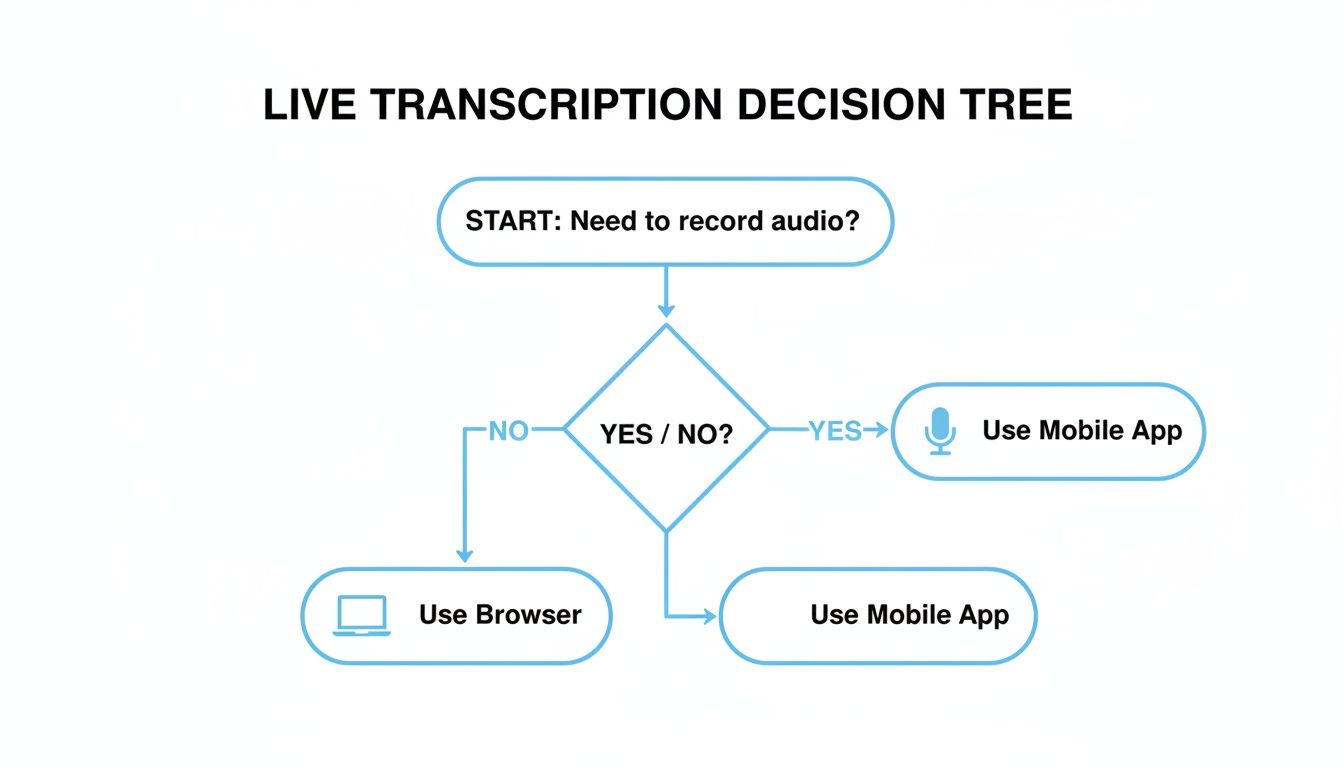
The key takeaway here is that your starting point—mobile or desktop—depends on whether you're capturing audio on the move or sitting at your desk.
Choosing the Right Export Format for Your Needs
To make it even clearer, here’s a quick breakdown of which format to choose based on your end goal. Picking the right one ensures your transcript is immediately ready for action.
| Format | Best For | Example Use Case |
|---|---|---|
| TXT | Simplicity, notes, and universal sharing | Pasting meeting notes into an email or document |
| SRT | Video captions and subtitles | Adding accessible captions to a YouTube video |
| VTT | Web video captions (HTML5) | Displaying subtitles on a custom website player |
| JSON | Developers and data analysis | Integrating transcript data into an application |
Ultimately, your project dictates the format. For video, you'll almost always want SRT or VTT. For data and development, JSON is the way to go. For everything else, TXT is a safe bet.
Unlocking Insights with AI Features
Beyond just getting the text in the right format, this is where you can reclaim hours of your time. With a platform like SpeechYou, available on the web and through its mobile apps, you can instantly make sense of even the longest recordings.
Instead of re-listening to an entire meeting, you can ask the AI directly, "What were the main action items for the marketing team?" and get a concise, accurate answer. This transforms your transcript from a passive record into an interactive knowledge base.
You can ask for summaries, pull out important quotes, or identify key themes without ever having to manually skim the document. This is the difference between simply having a transcript and actually using it to get work done.
Practical Tips for High-Accuracy Transcription
Getting a clean transcript often comes down to your setup, not just the software. While the AI does the heavy lifting, you can give it a huge leg up by feeding it the best possible audio. A few simple tweaks can dramatically improve the accuracy when you convert speech to text online free.
The single biggest difference-maker is your audio quality. Start by killing as much background noise as you can. That means finding a quiet room, shutting the door, and staying away from humming refrigerators or open windows. Even low-level ambient sounds can trip up the AI and muddle the results.
Next, get a decent microphone. You don't need a professional studio rig; a simple external USB mic or even the one on your gaming headset is a massive upgrade from your laptop's built-in microphone, which loves to pick up every single keyboard click and fan whir.
Speaking for Clarity
How you speak is just as critical as your gear. Aim for a clear, consistent pace—not rushed, but not artificially slow either. Enunciate your words, but don't overdo it to the point where it sounds unnatural to the AI. If you have multiple speakers, try to get everyone to avoid talking over each other. That’s a surefire way to get a jumbled mess of a transcript.
This is especially true in multilingual settings. We're seeing a massive demand for versatile tools, particularly in the Asia-Pacific region, which is looking at a 14.86% CAGR in speech-to-text tech. With smartphone use over 75% and huge government investments in AI, tools that handle local languages are no longer a nice-to-have, they're essential. This is where a service like SpeechYou really shines by automatically detecting over 100 languages and dialects—a crucial feature for anyone working in diverse environments.
The goal is to give the AI the cleanest signal possible. Think of it like a real conversation: the clearer one person speaks, the better the other person understands. A few small adjustments to your space and your speaking habits will pay off with a much more accurate transcript.
Ensuring Your Data Stays Secure
Finally, let's talk security. A perfect transcript is useless if the conversation was sensitive and the data gets compromised. Always, always choose a service that puts privacy first.
Look for key features like end-to-end encryption and storage on SOC 2-compliant servers. This is your assurance that private discussions, from internal strategy sessions to confidential client meetings, stay that way. For a deeper dive into locking down your remote conversations, check out our guide on how to get a Zoom meeting transcript safely.
Your Top Transcription Questions, Answered
When you're looking to convert speech to text online free, a few questions always pop up. Let's clear the air so you can pick the right tool and know exactly what to expect.
A common point of confusion is "speech-to-text API" versus "speech recognition API." Honestly? They're the same thing. One term describes the function (getting text from speech), while the other describes the tech that does it (recognizing the speech). In the real world, people use them interchangeably.
Another big question: are free versions just less accurate? Not really. Most services use the same core AI model for both their free and paid tiers. You're getting the same high-quality transcription; the main difference is the limits, like how many minutes you can process each month.
Should I Use an API or an Open-Source Model?
This really comes down to your technical know-how and what you’re trying to accomplish. An API-based service is built for speed and reliability. It's essentially a "plug-and-play" solution that lets you get incredible results without needing a team of engineers to build and maintain it.
Going the open-source route, on the other hand, gives you total control but demands serious technical chops. You’re responsible for everything: setup, fine-tuning, maintenance, and troubleshooting. For most people, a ready-to-go service is way more practical.
The bottom line is this: for the vast majority of users—from podcasters to researchers—a dedicated platform like SpeechYou strikes the perfect balance. You get top-tier accuracy and a suite of powerful features without any engineering headaches, plus the convenience of using it in your browser or on mobile apps for iOS and Android.
Do Free Tools Handle Different Languages?
Absolutely. Modern transcription tools are designed for a global world. The best platforms don't just handle one language; they can automatically detect and transcribe dozens, sometimes hundreds, of languages and dialects.
This is a non-negotiable feature if you're working with international clients, analyzing multilingual audio, or creating content for a global audience. For instance, a tool like SpeechYou supports over 100 languages, making it a powerhouse for almost any project you can throw at it.
And if you hit your free monthly limit? Most services will simply pause your ability to transcribe more files until your allowance resets, or they'll give you a friendly nudge to upgrade. It’s always smart to check the provider's policy so you don't get caught by surprise.
How Safe Is My Data with Online Transcription Tools?
Privacy is a huge deal, especially if you're transcribing sensitive meetings, patient notes, or confidential interviews. Any reputable provider will make data security their top priority.
When you're evaluating a service, look for these security commitments:
- End-to-end encryption: This protects your data from the moment you upload it.
- SOC 2 Compliance: An industry-standard audit that proves a company has secure data handling practices.
- Secure Storage: Your files should be stored in highly protected, encrypted cloud environments.
When a platform is transparent about its security, you can transcribe with peace of mind, knowing your private conversations will stay that way.
Ready to turn your spoken words into accurate, actionable text? SpeechYou makes it dead simple. With our powerful browser-based tool and dedicated mobile apps, you can capture every detail from your meetings and audio files, get instant summaries, and export your work in any format you need. Give it a try for free and see how easy transcription can be.
Tags
Share this article
Related Articles

Top 12 Ways to Convert Audio to Text Online Free in 2026
Discover the 12 best tools to convert audio to text online free. Our 2026 guide reviews top services...

Beyond Whisper: Why MultiLingual Pro Changes Speech-to-Text for 1,700 Languages
How Speechyou's MultiLingual Pro expands speech-to-text to about 1,700 languages—and what language s...

Transcribe Voice Memo to Text: How to transcribe voice memo to text on devices
Learn how to transcribe voice memo to text quickly on iPhone, Android, and web with AI tools like Sp...