Speechyou vs. Trint · Updated September 13, 2026

Your interviews.
Ready for the next step.

Try Speechyou Solo at US$67/year for your own recordings. Compare it with Trint Pro’s EUR828/year offer and its tools for editorial production.[10][1]

3-day free trial. Solo: US$67 billed yearly or US$15 monthly.
Annual plans are charged upfront. Renews unless canceled.

app.speechyou.com/demo
12 min ago · 31:42 Meeting Work

Launch planning — final checklist

The team confirmed the release timeline, assigned the remaining launch tasks, and agreed to run one final quality check before publishing.

Play31:42
Speaker 1Speaker 2

Speaker 10:00

Let's use this session to close the final launch items and make sure every owner is clear on the timing.

Speaker 20:08

The product walkthrough is ready. I only need the final captions and the approved release note.

Speaker 10:18

I'll send both this afternoon, then we can complete the quality check tomorrow morning.

Speaker 20:28

Once that passes, the launch page and customer email can go live together at ten.

Interactive Speechyou demo · Illustrative meeting content[15]

US$67 / yearSpeechyou Solo, charged annually[10]
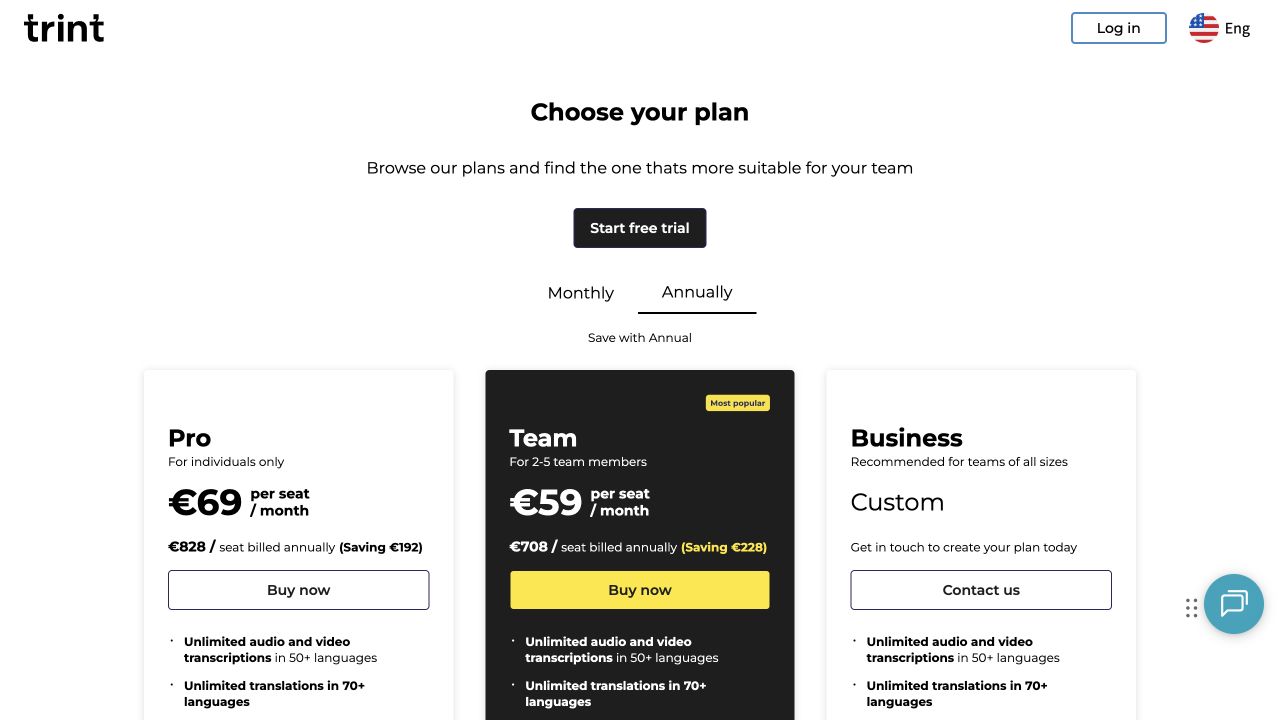
Current Trint plansPro, Team and Business in the live selector[1]
Your workflow decidesPersonal notes or collaborative editorial production[15][4][1]

What changes when you switch?

Trint is built around turning recordings into editorial work, with collaborative production and newsroom integrations. Speechyou is worth testing for an individual recording-to-notes workflow. This page uses the current Pro, Team and Business selector, rather than repeating older Starter and Advanced pricing.

Current individual plans and explicitly identified product differences
What matters to youSpeechyou SoloTrint
Monthly subscription[10][1]US$15 / month for SoloPro: EUR85 per seat/month in reviewed session
Annual subscription[10][1]US$67 billed yearly for SoloPro: EUR828 per seat/year; currency differs from Solo’s USD
Transcription allowance[10][1][2]Unlimited notes on Solo; not a throughput guaranteeUnlimited day-to-day transcription; fair use and archive exclusions apply
File size[10][3]Up to 10 GB per file on SoloHelp recommends under 3 GB and 3 hours; larger files may fail
Free option[10][7]3-day free Solo trial; renews unless canceled7 days; help describes three 5-minute previews; confirm current signup terms
Transcription languages[11][12][1][6]1,600+ languages; about 1,700 language/script optionsCurrent plans: 50+ transcription languages; older help intro says 40+
Accuracy evidence[12][14][6]Whisper + MultiLingual Pro; no controlled head-to-head scoreNo controlled Speechyou comparison; evaluate the actual audio
Speakers & timestamps[15][12][4]Speaker labels and timestamps; behavior varies by modelEditable transcripts with production timecodes and speaker workflow
Batch workflow[15][5][2]Upload multiple recordingsBulk export is documented; archive processing has separate terms
Transcript questions & summaries[10][15][1]Ask AI inside Speechyou on SoloAI-powered summaries listed on current Pro
Subtitle controls[15][8]SRT/VTT exports and detailed segmentation controlsCaption Editor with editable blocks and subtitle timing
Export formats[15][4]TXT, SRT, VTT, JSONDOCX, CSV, EDL, XML, SRT, VTT, STL; varies by content type
Mobile workflow[16][1]iPhone and iPad app; also available on MacMobile and desktop live transcription listed; Pro includes 1 hour/month
Developer API[13][1][9]Access by request, with separate commercial termsCurrent Business plan lists APIs; confirm access for your agreement
MCP & external AI[17][1][9]Connect compatible Claude, ChatGPT, Cursor and other clientsNo public native MCP server verified in the sources reviewed
Organization & collaboration[10][15][1]Tags, search, and three Solo workspacesTeam: 2–5 members, shared drives and real-time collaborative editing
Human transcription service[10][1]AI workflow; human proofreading is not included in SoloAI workflow; human transcription service not included in reviewed Pro

“Not verified” describes a limit of this research, not proof that a feature is unavailable. Product, API and human-service capabilities are distinguished. On small screens, scroll the table horizontally.

Choose the workspace your work needs.

Solo’s price is US$67 annually. The Trint session showed Pro at EUR828 annually. Prices are shown in their original currencies. Your final cost depends on checkout currency, tax and any conversion fees.[10][1]

Original currencies shown: Speechyou in USD · Trint in EUR

Speechyou Solo

For your recordings, notes and AI workflow

$67/ year

USD · billed yearly, upfront[10]

  • Unlimited notes · up to 10 GB per file
  • 1,600+ languages with model options
  • Ask AI, translation and subtitle exports
  • iPhone, iPad and Mac apps; MCP connector
Try Speechyou free

3-day free trial. Renews at your selected price unless canceled. API access has separate terms.

Trint Pro

Price for one seat

€828/ year / seat

EUR · billed yearly, upfront[1]

  • Unlimited day-to-day audio/video transcription, subject to fair use
  • 50+ transcription and 70+ translation languages advertised
  • AI summaries and Caption Editor
  • One hour of live transcription per month
Verify Trint pricing

Trint displayed EUR in the reviewed browser session: €85 monthly or €828 annually for Pro. Speechyou prices are USD. We do not calculate a cross-currency saving; your checkout currency, exchange rate and tax can differ. Prices checked September 13, 2026; taxes and currency conversion excluded. Different plans include different features and allowances.

The other Trint options worth comparing

Published options; annual amounts are paid upfront
OptionPrice & allowanceWhen it may fit
Trint ProEUR85/month or EUR828/year per seat
Individual use; unlimited day-to-day transcription under fair use
AI summaries, Caption Editor and one hour of live transcription per month.
Trint TeamEUR78/month or EUR708/year per seat
For 2–5 team members; each seat is billed
Shared drives and real-time co-editing. This is not a five-person bundle at one seat’s price.
Trint BusinessCustom quote
Business-specific production, administration and live workflows
Newsroom integrations, APIs, onboarding and enterprise requirements.

Plan and service figures from the sources below. Illustrative per-file totals are arithmetic examples, not measured customer savings.[1]

Find your language. Try your audio.

Trint’s current plan selector advertises transcription in 50+ languages and translation in 70+. Its support article opens with an older 40+ transcription figure but provides a named language list. We use the current plan headline and make the difference visible; check the actual language selector when you test.[1][6]

Speechyou’s catalog covers 1,648 distinct language codes across 1,668 language/script configurations. Broader coverage can matter for interviews in less widely served languages. It does not prove better accuracy on a language both tools support, or imply that every transcription language has an equally capable translation direction.[11][12]

Browse all Speechyou languages

Find the right starting point

Speechyou offers Whisper and MultiLingual Pro. Check the catalog for your exact language and script, then test a recording.

These are Speechyou language examples, not a claim that Trint lacks all four. Language availability is not an accuracy guarantee.[11][12]

Bring your toughest recording.

Use the same audio in both tools. The names, numbers and speaker changes you need are a better test than a headline percentage.

  1. Bring a real recording

    Start your free trial and upload a representative interview, lecture or video. Choose the correct language in both products.

  2. Check what matters

    Listen to difficult passages. Check names, figures, quotations and speaker labels, then note the time needed to correct them.

  3. Try the next step

    Ask for a summary and verify it. Export the file you actually need and open it in your usual software before deciding.

Try your own audio free

3-day free trial. Renews at your selected price unless canceled.

A fair test compares the actual products.

A newsroom workflow may depend on accurate quotations, timecodes and the ability to trace a statement back to the recording. Compare those details in both tools using the same interview. We did not run a controlled Trint-versus-Speechyou benchmark and do not infer the result from language counts or model-family research.[4][14]

How to run a useful comparison

Keep the source file and language consistent. Record the model and processing mode where available. Compare important factual errors, speaker attribution, timestamps and time spent editing. If you calculate word error rate, use the same manually checked reference transcript. Keep translation, summarization and human proofreading separate from the raw transcription result.

Whisper research describes a model family and its limitations. It is not a score for either hosted product. We have not established a controlled head-to-head benchmark for this page.[14][12]

Your transcript is just the start.

Compare what happens after the words appear: finding a quote, asking a question, sharing a note, or delivering the right file.

Turn an interview into usable notes

Speechyou gives you a transcript plus Ask AI for summaries and questions. Trint Pro also lists AI summaries. Start with the output you need: notes for your own work, a reviewed quote, a script or a handoff to an editor. An individual notes workspace and a production platform can both transcribe, while serving different next steps.[10][15][1]

Explore interview notes

Keep production formats in the decision

Trint’s export guide includes editorial formats such as EDL and XML alongside subtitles and Word documents. Speechyou’s TXT, SRT, VTT and JSON formats may cover personal transcription and standard subtitle needs. They are not a promise of interchangeable editing-project exports. Test a file in your production software before migrating.[4][15]

Explore Speechyou subtitle output

Connect notes to your AI workspace

Speechyou’s MCP connector lets compatible AI clients retrieve and use your notes. Trint lists APIs and production integrations under its current Business offer; the older developer guide describes broader historical access. Confirm the plan and workflow you need. A consumer MCP connection and a newsroom API integration solve different tasks.[17][1][9]

Connect Speechyou to AI

Take Speechyou on the go

Record an idea between appointments, transcribe an interview and share a summary from your phone. Speechyou is available on iPhone and iPad, with a Mac app too. Check the comparison table for Trint’s mobile options; compare recording, editing and export options on the devices you use.[16]

Explore the mobile app

Bring your bigger recordings

Speechyou Solo supports files up to 10 GB. Batch-upload recordings, organize them with tags and search, and keep the transcript alongside your notes. File size is separate from duration, storage and processing speed. Check the sourced competitor limits in the table before making a large-file decision.[10][15]

Transcribe your recordings

Build around your integration

Speechyou offers API access by request. Bring the team your languages, input sources, volume, output formats and latency requirements to scope the integration and commercial terms. API access is separate from Solo. The table distinguishes Trint’s developer offering from its web subscription.[13]

Discuss API access

Real screens. Clear context.

Browser captures of the public product pages reviewed. Scroll inside a long capture or open it at full size; each image links back to its source.

Trint current Pro, Team and Business plans with euro annual pricing

Current annual selector in EUR. Pro shows €828 per seat yearly; older Starter/Advanced prices are not used.

View full captureOriginal sourceCaptured September 13, 2026

A useful comparison shows both sides.

Choose Speechyou when…

  • You want Solo’s US$67 annual subscription for your own recordings.
  • You need language or script coverage beyond Trint’s confirmed catalog.
  • You want transcript questions inside your notes and access from compatible MCP clients.
  • Standard text and SRT/VTT exports fit your workflow.
Try Speechyou free

Consider Trint when…

  • Shared drives and real-time editorial collaboration are central to your work.
  • You need production formats such as EDL or XML.
  • You rely on newsroom integrations or an agreed Business API workflow.
  • Live transcription and a coordinated editorial production process matter more than a personal notes app.
Check the supporting sources

The details behind the table.

Billing models, usage rules and production requirements can matter more than a feature count.

Why are these prices different from older Trint reviews?

The live plan selector reviewed for this page shows Pro, Team and Business. Many older reviews and some help articles still mention Starter, Advanced or Enterprise. Rather than transfer their old prices into a current comparison, the screenshots document the anonymous selector and its EUR billing amounts. Ask Trint about your checkout currency and any existing-account terms. This page does not convert currencies or claim a particular percentage saving against a historical plan.[1][9][7]

Does unlimited transcription include an entire archive?

Trint describes unlimited day-to-day transcription under fair use. Its live FAQ separates archival projects, continuous live transcription and bulk-volume projects from that allowance. Its terms allow separate arrangements for high-volume work and throttling to protect the service. Speechyou’s unlimited notes likewise do not establish an archive capacity or turnaround guarantee. For a large library, describe the hours, file sizes, arrival rate and deadline to the provider before subscribing.[1][2][10]

How do upload and export constraints affect switching?

Trint’s help recommends keeping a file below both three hours and 3 GB; it says larger files may encounter errors, rather than describing an absolute refusal at the boundary. The same guide excludes media-link uploads in its standard workflow. Speechyou Solo supports 10 GB files and has a YouTube transcription workflow. For export, retain the original recordings and check production formats: Trint’s EDL/XML and Story exports are not equivalent to a plain transcript or a JSON file.[3][4][15][10]

Your questions, answered.

How much does Trint cost in this comparison?

The live public selector showed Trint Pro at EUR85 monthly or EUR828 annually per seat. Team showed EUR78 monthly or EUR708 annually per seat for teams of 2–5. Business was custom-priced. These are the EUR offers shown in the reviewed session; verify your own checkout currency and terms.[1]

Why is there no percentage saving against Trint?

Speechyou Solo is priced here in USD while Trint displayed EUR. Subtracting the two amounts would be misleading. We show both original currencies so you can compare your actual checkout totals, including any tax or exchange-rate conversion.[1][10]

Is Trint unlimited?

The current plans advertise unlimited day-to-day transcription under fair use. The pricing FAQ and terms treat archives, bulk projects and continuous live transcription separately. Confirm the arrangement for a high-volume project before buying a standard plan.[1][2]

Should I keep Trint for video production?

It is worth keeping when EDL/XML exports, shared drives, co-editing or newsroom integrations are essential. Speechyou offers text, SRT, VTT and JSON outputs, but does not claim equivalent Story files or production-project handoffs.[4][1][15]

What is included in Trint’s free trial?

Trint’s help describes seven days and three uploads with the first five minutes transcribed from each. That article still uses an older Advanced plan name, so confirm the current allowance at signup. Speechyou offers a three-day free Solo trial that renews at the selected subscription price unless canceled.[7][10]

Is Speechyou more accurate than Trint?

We have not established that in a controlled product comparison. Use the same recording and language in both tools, check names, numbers and speaker changes against the audio, and measure correction time. Model research and vendor accuracy percentages are not a substitute for this test.[14][12]

What does 1,700 languages mean?

It is a rounded catalog figure. The application catalog reviewed contains 1,668 language/script configurations across 1,648 distinct language codes. Multiple scripts can belong to one language. This describes coverage, not equal accuracy in every language or a count of translation directions.[11][12]

Can I try my own recording for free?

Yes. Start your three-day free trial of Speechyou Solo, then upload your audio or video. Try the transcript, Ask AI and the exports you need. Your subscription renews at the selected price unless canceled; check your chosen billing period at signup.[10][15]

Can I use Speechyou on my phone and with my AI assistant?

Speechyou is available on iPhone, iPad and Mac. Its MCP connector lets compatible AI clients search and read your notes and transcripts. Claude, ChatGPT, Cursor and other clients require their own supported connector setup; availability can depend on the client and its plan.[16][17]

Can I move all my Trint files to Speechyou?

Keep your original recordings and export any edited transcripts you need before leaving your existing service. Upload supported recordings to Speechyou within its plan limits. A one-click transfer of folders, edits, comments, permissions and speaker identities has not been verified. Test a few representative files before moving a library.[15][10]

A comparison you can check.

Published by Speechyou, a Trint competitor. Reviewed September 13, 2026. We checked public product and pricing pages, help articles and browser-visible plan selectors. Speechyou capabilities also draw on the product configuration and owner-confirmed offer used for this comparison. We did not test a paid Trint account or run a controlled transcription benchmark.

Prices keep their stated currencies and billing periods. Annual totals calculated from monthly equivalents are labeled. Vendor claims, documentation differences and unverified capabilities are identified. Screenshots show public pages; the Speechyou demo contains sample content. Features and prices can change.

View all 17 sources
  1. Trint — Live plan selector

    Anonymous browser capture: Pro €85/month or €828/year; Team €78/month or €708/year per seat. Currency was EUR. Current plan names are Pro, Team and Business.

  2. Trint — Terms and fair use

    Updated August 4, 2026. Unlimited day-to-day use is subject to fair use; high-volume/archive arrangements and throttling provisions.

  3. Trint Help — Supported file specifications

    Guidance recommends files under three hours and 3 GB. Links to media are not accepted in the described standard upload workflow.

  4. Trint Help — Export formats

    Transcript, story and caption formats, including DOCX, EDL, XML, SRT, VTT and STL. Includes a June 2026 retirement note for HTML exports.

  5. Trint Help — Exporting

    Bulk export, highlights, comments, markers and timecode options.

  6. Trint Help — Supported languages

    Named language list. Its older 40+ introduction differs from the current plan selector’s 50+ headline.

  7. Trint Help — Seven-day trial

    Help article describes three files with five minutes transcribed per file. It still uses an older Advanced plan name; verify the current signup offer.

  8. Trint Help — Caption Editor

    Subtitle block editing, duration controls and caption exports.

  9. Trint — API pricing guide

    Legacy developer guide says access exists on several plans and recommends Enterprise for heavy use; current selector places API integrations under Business.

  10. Speechyou — Solo pricing

    $15 monthly / $67 annually; cross-checked against the app’s plan and onboarding configuration.

  11. Speechyou — Transcription language catalog

    Browse language and script options. The rounded 1,700 claim describes catalog breadth, not equal accuracy.

  12. Speechyou — Beyond Whisper: MultiLingual Pro

    Model choice, language/script distinctions, and evaluation limitations; cross-checked with application code.

  13. Speechyou — Speech-to-text API

    Access by request; scope and commercial terms agreed separately.

  14. OpenAI — Whisper repository and evaluation

    Model-family documentation and language-dependent performance. Not a test of either hosted product.

  15. Speechyou — Public product demo

    Screenshot of the public demo with illustrative meeting content, captured September 13, 2026.

  16. Speechyou — Speechyou mobile app

    Record, transcribe, summarize, and share on iPhone and iPad; also available on Mac.

  17. Speechyou — MCP connector for your notes

    Connect notes to Claude, ChatGPT, Cursor, and other MCP-compatible clients. Client setup and plan requirements apply.

Found a change? Send a correction.

Find your next transcription workflow.

Compare another transcription tool

Your own audio is the real test.

Bring one recording. Check the transcript, ask a question, and see if it fits your workflow.

Try your own audio free

3-day free trial.
Subscription renews unless canceled.

Trint is a trademark of its owner. No affiliation or endorsement.